Motivation
I started learning Chinese on Duolingo in August 2024. In October I came across Isaak Freeman's inspirational post about reaching intermediate fluency in 12 months (via Hacker News) with Anki as a significant part of his process. The part that most blew me away was the video of him reviewing flashcards while jogging on a treadmill - at the time I found it incredible how fast he seemed to digest each card.
About a year later, Anki flashcards have become the main way that I study Chinese (and I similarly 'habit stack' by reviewing flashcards while jogging/cycling, or on my commute). People are often intrigued by the Anki app - maybe they are familiar with it from academic revision contexts but don't necessarily expect it to be a useful tool for language learning. I want to share how I've customised it with some code to maximise its effectiveness.
Note: other important language strategies include 'comprehensible input' and 'immersion'. So far I've watched the first seasons of The Daily Life of the Immortal King (仙王的日常生活), Link Click (时光代理人) and Uncharted Walker (迷域行者). I use a python/ffmpeg script to split each video file into chunks which get played twice with the first playthrough blurring the subtitles (so I can try to get the meaning solely from audio).
Data structure & script setup
Anki cards are organised into decks, and some cards link to media files (images, sound clips). This data, plus your review history (e.g. current card difficulties and time until next review) and any misc settings is known as your 'collection'.
A lot of people will construct their own decks over time (a process known as 'mining') and can do interesting things with AI to facilitate this, but I decided to start my learning journey with premade decks.
Anki cards can be thought of as the pure information (e.g. a Mandarin word and its English meaning), but sometimes it's helpful to render this information in different ways (e.g. (a) show the Mandarin and ask for the English, or (b) show the English and ask for the Mandarin). We set up templates called 'card types' depending on which pieces of information (i.e. 'fields') we want to display, and generally use a new deck for each card type (i.e. I have a separate 'reading', 'listening' and 'speaking' decks depending on which fields I want to display - for example my speaking deck, which is just a different way of rendering a deck of Mandarin sentences, shows me an English sentence and my task is to speak the Mandarin equivalent).
I use AnkiDroid to review these decks on mobile and Anki Desktop on Windows. The collection and review data is synced via AnkiWeb.
The nice thing about Anki data is that we can export it and analyse it. It exports as a .colpkg file which is actually just a .zip archive with a different extension. This contains the cards (including review data) in an .anki21 file (I now have to select 'Support older versions' in AnkiDroid as it has updated to give .anki2b files and I haven't yet checked if my scripts will support this) and optionally the media files in a subdirectory.
The .anki21 file is the main input to our analysis scripts. It is actually a SQLite database which contains the cards, review data, and some objects which represent the decks and card types (termed 'models' in the database). I haven't looked at all of the data yet! The granular review history looks interesting.
The basic pattern for analysing Anki data will be as follows:
- hardcode path to the latest .anki21 collection file (SQLite database)
- run a sqlite3 query in Python to get the relevant data
- analyse the fields in the data (e.g. sort by card difficulty)
Before querying for card data, we can check which decks the collection contains:
import sqlite3
import json
import csv

ANKI_COLLECTION_INFILE = r'local\\anki\\collections\\collection-2025-08-12\\collection.anki21'

# Open the SQLite3 database
conn = sqlite3.connect(ANKI_COLLECTION_INFILE)
cursor = conn.cursor()

# Fetch the deck information from the col table
cursor.execute("SELECT decks FROM col LIMIT 1")
decks_data = cursor.fetchone()

if decks_data:
    decks = json.loads(decks_data[0])
    for deck_id, deck_info in decks.items():
        if ("Mandarin" in deck_info.get('name')) or ("Chinese" in deck_info.get('name')):
            print(f"Deck ID: {deck_id}, Name: {deck_info.get('name')}")
else:
    print("No deck data found.")
giving:
# Deck ID: 1727904089773, Name: Mandarin: Vocabulary::a. HSK
# Deck ID: 1748000867369, Name: Spoonfed Chinese [Speaking]
# Deck ID: 1742915410699, Name: Spoonfed Chinese [Listening]
# Deck ID: 1727892404417, Name: Spoonfed Chinese
# Deck ID: 1, Name: Chinese Tones
# Deck ID: 1727904089772, Name: Mandarin: Vocabulary
It is also helpful to use a method for expanding fields. Different cards will have different fields and these are generally stored in the auxiliary flds field as a string delimited by \x1f. This script is a good starting point for future analysis scripts. Note that it assumes each deck only uses one card type for all cards:
import sqlite3
import pandas as pd
import json

ANKI_COLLECTION_INFILE = r"collections/collection-2025-08-12/collection.anki21"

# Deck IDs of interest
deck_ids = {
    "reading": 1727892404417,     # Spoonfed Chinese
    "listening": 1742915410699,   # Spoonfed Chinese [Listening]
    "speaking": 1748000867369,    # Spoonfed Chinese [Speaking]
    "vocab": 1727904089773        # Mandarin: Vocabulary::a. HSK
}
deck_id_tuple = tuple(deck_ids.values())
deck_id_to_name = {deck_ids[n]: n for n in deck_ids.keys()}

# Get cards from collection
conn = sqlite3.connect(ANKI_COLLECTION_INFILE)

cards_df = pd.read_sql_query(f"""
    SELECT
        cards.id AS card_id,
        cards.did AS deck_id,
        cards.reps,
        cards.ivl,
        cards.factor,
        cards.lapses,
        cards.due,
        notes.flds,
        notes.mid AS model_id
    FROM cards
    JOIN notes ON cards.nid = notes.id
    WHERE cards.did IN {deck_id_tuple}
""", conn)

# --- Load model schemas ---
cursor = conn.cursor()
cursor.execute("SELECT models FROM col LIMIT 1")
models_json = cursor.fetchone()[0]
models = json.loads(models_json)
conn.close()

# Map model_id -> list of field names (ordered)
model_fields = {int(mid): [f['name'] for f in m['flds']] for mid, m in models.items()}

# --- Expand fields dynamically ---
def expand_fields(row):
    fields = row['flds'].split('\x1f') if pd.notna(row['flds']) else []
    model_id = row['model_id']
    names = model_fields.get(model_id, [])
    data = {}
    for i, name in enumerate(names):
        data[name] = fields[i] if i < len(fields) else None
    return pd.Series(data)

expanded_df = cards_df.join(cards_df.apply(expand_fields, axis=1))
expanded_df.head()
giving (some rows and columns omitted for brevity):
             card_id        deck_id  reps  ivl  factor  lapses   due English Hanzi                     HandwrittenSentence
7331   1419644220831  1727892404417     7  900    3250       0  1245  Hello!   你好!  <img src="1419644220831-sentence.png">
19644  1742915410700  1742915410699     4  266    2950       0   568  Hello!   你好!                                     NaN
26712  1748001702520  1748000867369     4   63    2800       0   349  Hello!   你好!                                     NaN
Generating audio files for spoken Chinese
I use the Spoonfed Chinese deck for Mandarin sentences, but every so often I would get shown a card which was missing its audio file (where a native speaker reads out the sentence) - this would give an error message in AnkiDroid and no sound would play. I wanted to fix this.
Initially I wrote a script to check the difference between my local media file directory (Anki Desktop uses AppData\Roaming\Anki2\User 1\collection.media) and the media files referenced on my cards (you can see the way I was handling field names here is not as robust as the dynamic way I suggested above):
...
cursor.execute(query)
cards = cursor.fetchall()

# Fetch deck information from the col table
cursor.execute("SELECT decks FROM col LIMIT 1")
decks_data = cursor.fetchone()
decks = json.loads(decks_data[0]) if decks_data else {}

# Get list of available media files
if os.path.exists(MEDIA_DIR):
    available_media = set(os.listdir(MEDIA_DIR))
else:
    available_media = set()
    print(f"Warning: Media directory {MEDIA_DIR} not found.")

# Function to extract media filenames from fields
def extract_media(flds):
    media_files = []

    # Extract [sound:filename.mp3] references
    sound_matches = re.findall(r'\[sound:([^\]]+)\]', flds)
    media_files.extend(sound_matches)

    # Extract <img src="filename.jpg" /> references
    image_matches = re.findall(r'<img src="([^"]+)" />', flds)
    media_files.extend(image_matches)

    return ", ".join(media_files)  # Return a comma-separated list of media files

# Extract relevant metadata and check for media files
metadata = []
for card in tqdm(cards):
    card_id, nid, deck_id, fields = card

    # Get deck name
    deck_info = decks.get(str(deck_id), {})
    deck_name = deck_info.get('name', 'Unknown DeckName')

    # Split fields using Anki's separator \x1f
    fields_list = fields.split('\x1f')
    # Handle different numbers of fields in the note (e.g., front, back, extra fields)
    if len(fields_list) >= 2:
        front = fields_list[0]
        back = fields_list[1]
    else:
        front = fields_list[0]  # If there's only one field, use it as both front and back
        back = ""        # Create a dictionary for additional fields (all fields except front and back)
    additional_fields = {}
    for i, field in enumerate(fields_list[2:], start=3):  # Fields after front and back
        additional_fields[f"Field_{i}"] = field

    # Convert additional fields dictionary to a string representation
    additional_fields_str = json.dumps(additional_fields, ensure_ascii=False)

    # Extract media file from fields
    media_files = extract_media(fields)

    # Check if media files exist
    missing_media = []
    if media_files:
        for media_file in media_files.split(", "):
            if media_file and media_file not in available_media:
                missing_media.append(media_file)
    media_missing = "Yes" if missing_media else "No"

    # Store metadata
    metadata.append([card_id, nid, deck_id, deck_name, front, back, additional_fields, media_files, media_missing])


# Write metadata to CSV
with open(OUT_FILE_CSV, 'w', newline='', encoding='utf-8') as file:
    writer = csv.writer(file)
    writer.writerow(["Card ID", "NID", "Deck ID", "Deck Name", "Front", "Back", "Additional Fields", "Media Files", "Media Missing"])
    writer.writerows(metadata)

# Close database connection
cursor.close()
conn.close()
but after doing this I found out you can just go to Anki Desktop and use Tools > Check Media to see a list of media which is referenced on cards but missing from the media directory - this is exactly what I'm looking for.
I decided to re-generate the missing files. In April 2025 this was very straightforward to do using Kokoro, an open-weight TTS model. (Note: Isaak Freeman does this with HyperTTS add-on in Anki, as well as loads of other cool optimisations). I ran the following in Google Colab:
!pip install -q kokoro>=0.3.4 soundfile
!pip install misaki[zh]
from kokoro import KPipeline
from IPython.display import display, Audio
import soundfile as sf
import os
import subprocess
import glob
import csv
import ast

def tts(text="你好!很高兴认识你!", voice='zm_yunjian', speed=0.8, save=False, filename=None):
    generator = KPipeline(lang_code='z')(
        text,
        voice=voice,  # <= change voice here e.g. zf_xiaoxiao, zm_yunjian (see https://huggingface.co/hexgrad/Kokoro-82M/tree/main/voices / http://huggingface.co/hexgrad/Kokoro-82M/discussions/89#67a05f828e344720ae144638 for zh)
        speed=speed,
        split_pattern=r'\n+'
    )

    for i, (gs, ps, audio) in enumerate(generator):
        #display(Audio(data=audio, rate=24000, autoplay=i == 0))
        if save:
            if not filename:
                sf.write(f'{i}.wav', audio, 24000)  # save each audio file
            else:
                sf.write(f'{filename}.wav', audio, 24000)

# example usage: tts("你好!我是英國人。", speed=0.8, save=True)

def process_csv(file_path):
    try:
        with open(file_path, newline='', encoding='utf-8') as csvfile:
            reader = list(csv.DictReader(csvfile))
            print(f"Total rows: {len(reader)}")

            filtered_rows = [row for row in reader if row.get("Media Missing") == "Yes" and row.get("Deck Name") == "Spoonfed Chinese"]
            print(f"Filtered rows: {len(filtered_rows)}")

            extracted_data = []
            for row in filtered_rows:
                try:
                    additional_fields = ast.literal_eval(row.get("Additional Fields", "{}"))
                    extracted_data.append({
                        "filename": row.get("Media Files", ""),
                        "input_sentence_zh": additional_fields.get("Field_3", "")
                    })
                except (ValueError, SyntaxError):
                    print(f"Skipping row due to invalid Additional Fields format: {row}")

            print("Extracted Data (sample):")
            for item in extracted_data[:5]:
                print(item)

            return extracted_data
    except FileNotFoundError:
        print(f"Error: File not found - {file_path}")
    except Exception as e:
        print(f"An error occurred: {e}")

zh_sentences_to_process = process_csv("anki_collection_metadata_with_media.csv")  # upload results of local python analysis script which identified missing files

# tts loop
from tqdm import tqdm
LIMIT = 10000
for input_data in tqdm(zh_sentences_to_process[:LIMIT]):
  tts(input_data['input_sentence_zh'], speed=0.8, save=True, filename=input_data['filename'].replace(".mp3",""))
and to download the results:
import zipfile
import glob
from google.colab import files

wav_files = glob.glob("*.wav")
with zipfile.ZipFile("wav_files.zip", "w") as zipf:
    for file in wav_files:
        zipf.write(file)

files.download("wav_files.zip")
I converted these to MP3 files using FFmpeg and finally added them to my Anki collection by uploading them into the Anki collection media folder (and then syncing the collection so that they also appeared on my other devices). I'm not sure that the tones are 100% accurate but it's definitely better than having no audio at all.
Generating images of handwritten characters
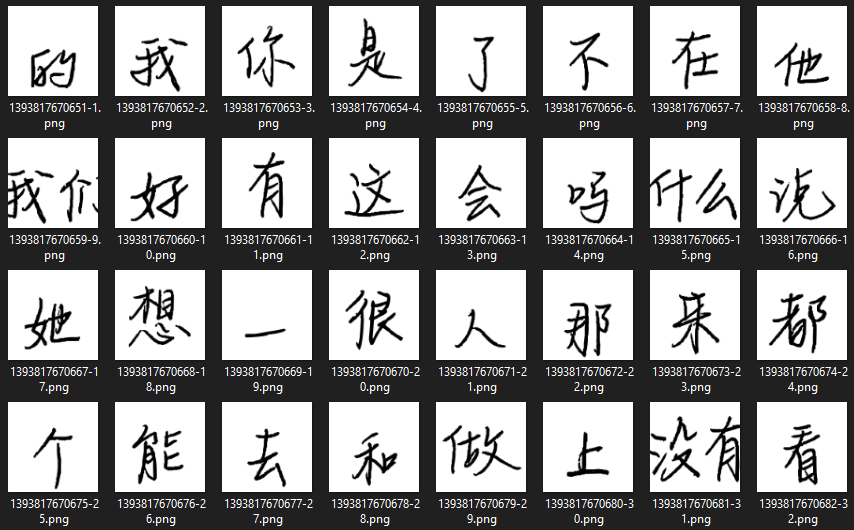
As my Chinese reading started to improve, I noticed that I struggled to read anything which wasn't written in clean computer font, so I decided to generate and add some handwritten font images as new fields.
I used a basic script to extract and export a CSV of my vocabulary (characters) deck, including columns: Card ID, Front, Back (which contains the Mandarin character - the name of this column comes from an inferior card data extraction script which created CSV rows based on numerical indexing of the SQLite query rows, rather than the more robust dynamic extraction script above; this does create a few oddities with how the image files and card field variables get named in the scripts below).
I also needed to get an appropriate font .ttf - I found LikeJianJianTi-Regular online (which covers Simplified Chinese) but also found others like HanyiSentyPea, SentyOrchid and MaShanZheng-Regular.
Then we can use PIL to generate images:
import os
import csv
from tqdm import tqdm

font_path = './LikeJianJianTi-Regular.ttf'  # path to your font
output_dir = './char_images'            # where to save images
font_size = 100                                 # adjust for image size
csv_path = "./anki_mandarin_characters_metadata.csv"

os.makedirs(output_dir, exist_ok=True)

def create_char_image(char, font_path, size=100, out_dir='char_images', filename=None):
    from PIL import Image, ImageDraw, ImageFont  #!pip install pillow

    font = ImageFont.truetype(font_path, size)

    # Get bounding box for centering
    dummy_img = Image.new('L', (1, 1))
    draw = ImageDraw.Draw(dummy_img)
    bbox = draw.textbbox((0, 0), char, font=font)
    text_width = bbox[2] - bbox[0]
    text_height = bbox[3] - bbox[1]

    # Add padding to ensure characters like "g", "y", or long radicals aren't clipped
    padding = 10
    img_width = text_width + 2 * padding
    img_height = text_height + 2 * padding
    img = Image.new('L', (img_width, img_height), color=255)
    draw = ImageDraw.Draw(img)
    # Draw text adjusted for bbox offset
    position = (padding - bbox[0], padding - bbox[1])
    draw.text(position, char, font=font, fill=0)

    # Use custom filename or default
    if not filename:
        filename = f"{ord(char)}_{char}.png"
    path = os.path.join(out_dir, filename)
    img.save(path)
    print(f"✅ Saved: {path}")

# Read characters and IDs from CSV
characters = []
with open(csv_path, newline='', encoding='utf-8-sig') as csvfile:
    reader = csv.DictReader(csvfile)
    skipped = 0
    for row in reader:
        card_id = row["Card ID"].strip()
        character = row["Back"].strip()
        front_label = row["Front"].strip()

        # Append tuple for image naming
        if len(character) > 0:
            characters.append((card_id, character, front_label))
        else:
            #print(f"Skipping empty character for card ID: {card_id} ({front_label})")
            skipped += 1

# Generate images
LIMIT = 10000
for card_id, char, front in tqdm(characters[:LIMIT]):
    try:
        filename = f"{card_id}-{front}.png"
        create_char_image(char, font_path, size=font_size, out_dir=output_dir, filename=filename)
        print(char)
    except Exception as e:
        print(f"❌ Error generating image for '{char}' (Card ID: {card_id}): {e}")

print(f"Skipped {skipped} empty characters")
To actually add these images to the cards, first add a new field (I called mine HandwrittenImage) to the relevant card type, then run the following script to process a .anki21 collection (it contains an optional dry run mode because now we are actually overwriting the Anki collection data):
import sqlite3
import json

# Config
ANKI_DB = r'collection-20250623210355\\collection.anki21'
TARGET_DECK_ID = "1727904089773"  # Mandarin Vocab
TARGET_FIELD_NAME = "HandwrittenSentence"

UPDATE_ANKI_DB = True  # False means dry run, True means actually overwrite the Anki files

conn = sqlite3.connect(ANKI_DB)
cursor = conn.cursor()

# Load note models
cursor.execute("SELECT models FROM col")
models_raw = cursor.fetchone()[0]
models = json.loads(models_raw)

# Build mapping from model ID to field index of 'HandwritingImage'
model_field_index = {}
for mid, model in models.items():
    field_names = [f['name'] for f in model.get('flds', [])]
    if TARGET_FIELD_NAME in field_names:
        index = field_names.index(TARGET_FIELD_NAME)
        model_field_index[int(mid)] = index

if not model_field_index:
    raise ValueError(f"⚠️ Field '{TARGET_FIELD_NAME}' not found in any note model.")

# Get note data for cards in the target deck
cursor.execute(f"""
    SELECT cards.nid, cards.id, notes.flds, notes.mid
    FROM cards
    JOIN notes ON cards.nid = notes.id
    WHERE cards.did = {TARGET_DECK_ID}
    LIMIT 1
""")

row = cursor.fetchone()
if not row:
    print("⚠️ No matching notes found in the specified deck.")
else:
    nid, card_id, flds, mid = row
    fields = flds.split("\x1f")
    target_index = model_field_index.get(mid)

    card_id_str = str(int(float(card_id)))
    front = fields[0].strip().replace("/", "_").replace("\\", "_")
    image_tag = f'<img src="{card_id_str}-{front}" />'  # this is the filename that we constructed in the previous script

    # Extend fields if necessary
    while len(fields) <= target_index:
        fields.append("")

    print("🔎 Before:")
    for i, field in enumerate(fields):
        print(f"  [{i}] {field}")

    fields[target_index] = image_tag

    print("\n✅ After:")
    for i, field in enumerate(fields):
        print(f"  [{i}] {field}")

# Now, update all notes if flag enabled
if UPDATE_ANKI_DB:
    print("\n🔄 Updating all matching notes in the database...")

    cursor.execute(f"""
        SELECT notes.id, cards.id, notes.flds, notes.mid
        FROM cards
        JOIN notes ON cards.nid = notes.id
        WHERE cards.did = {TARGET_DECK_ID}
    """)

    updates = []
    count_updated = 0

    for nid, card_id, flds, mid in cursor.fetchall():
        fields = flds.split("\x1f")
        target_index = model_field_index.get(mid)
        if target_index is None:
            continue  # skip if no target field

        card_id_str = str(int(float(card_id)))
        front = fields[0].strip().replace("/", "_").replace("\\", "_")
        image_tag = f'<img src="{card_id_str}-{front}" />'

        while len(fields) <= target_index:
            fields.append("")

        if fields[target_index] != image_tag:
            fields[target_index] = image_tag
            new_flds = "\x1f".join(fields)
            updates.append((new_flds, nid))
            count_updated += 1

    if updates:
        cursor.executemany("UPDATE notes SET flds = ? WHERE id = ?", updates)
        conn.commit()

    print(f"✅ Updated {count_updated} notes.")  # expected 5001 for the Mandarin vocab deck
else:
    print(f"\nNo database updates made since UPDATE_ANKI_DB is set to False.")

# Clean up
cursor.close()
conn.close()
This gives us an updated Anki collection .anki21 which we need to put back into a .colpkg and back into our app:
- Rebuild the .colpkg archive - for me this meant only including .anki21 and the media subdirectory but not .anki2 or meta (even though these appear in exported .colpkg), and archiving without any compression. With 7zip that is: 7z.exe a -tzip -mx=0 my_deck.colpkg collection.anki21 media
- Import the .colpkg via the Anki app
- Copy the media files into the media folder (e.g. AppData\Roaming\Anki2\User 1\collection.media)
- Run sync
I also used the same approach to generate handwritten sentences for the Spoonfed Chinese deck.
Adding Traditional Chinese to the Spoonfed deck
This deck initially only had Simplified Chinese characters, but I'm learning both in parallel so wanted to add a new field with the Traditional equivalent. This was achieved in much the same way as adding images:
- Add a new field (TraditionalSentence) via the Anki Desktop app
- Export the .colpkg and get the .anki21 file
- Process this file with a Python script similar to the one above (with the dry run mode, etc) - but instead of setting the new field value as an image path, set it to the Traditional Chinese text
- I used the chinese-converter package (chinese_converter.to_traditional(simplified_sentence)) to handle the transformation
- Re-zip the .colpkg as before, then import and sync
Note: this field won't be displayed unless you add {{TraditionalSentence}} to the relevant card template.
Giving the note templates a more dynamic display
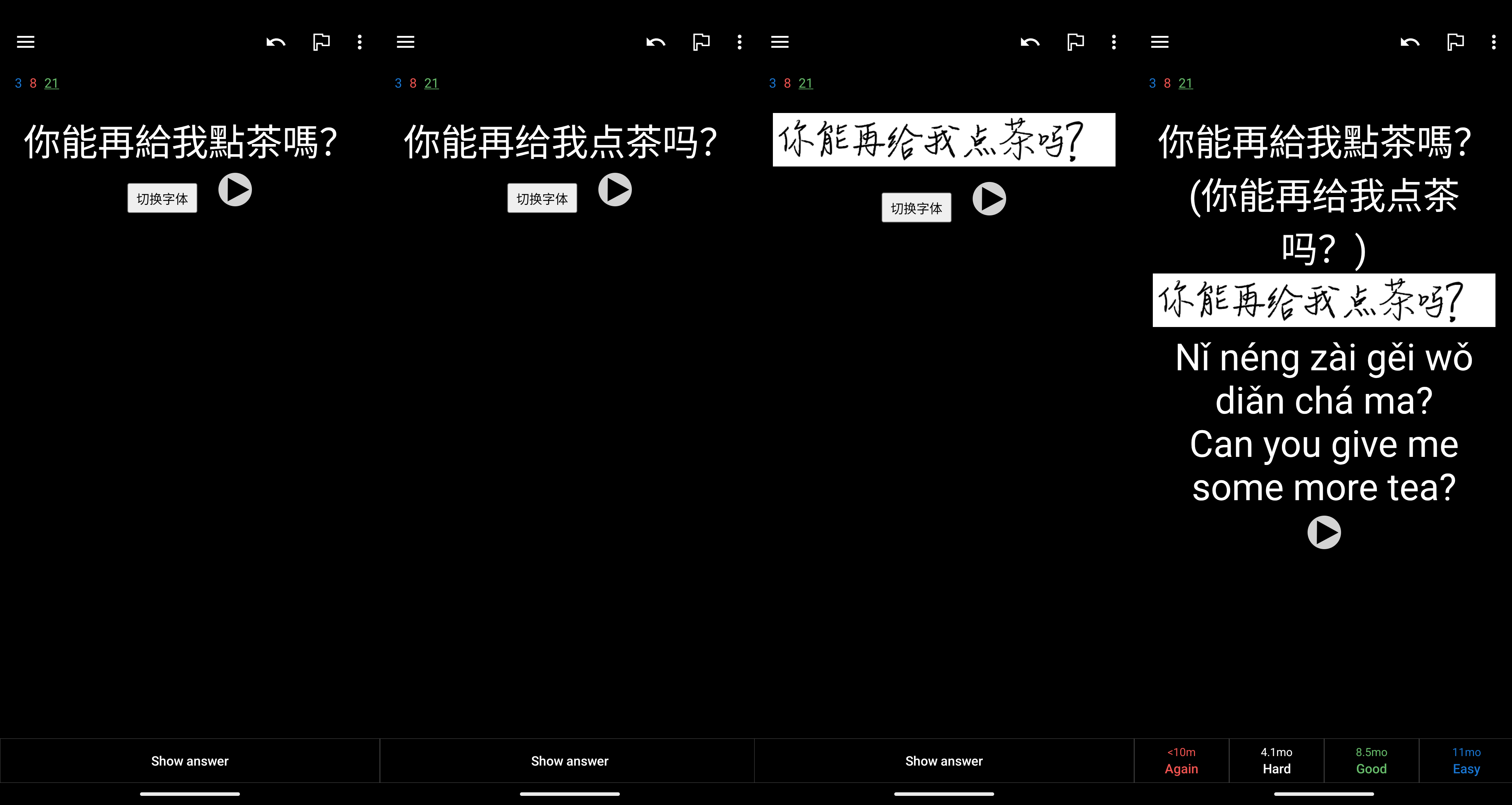
Now that we have different variants of the same field (i.e. simplified vs. traditional vs. handwritten), it would be nice to have Anki pick and display one at random when reviewing a card. Luckily, card types (which we already described as 'ways to render different field subsets') are HTML templates which accept JavaScript. Fields can be referenced for display using {{}} notation.
For my Spoonfed (reading) deck I use:
<div class="mystyle1" id="mainText"></div>
<button id="toggleBtn" style="margin: 6px; padding: 4px 8px; font-size: 14px;">
  切换字体
</button>
{{Audio}}

<script>
  const hanzi = `{{Hanzi}}`;
  const traditional = `{{TraditionalSentence}}`;
  const handwritten = `{{HandwrittenSentence}}`;

  const variants = [hanzi, traditional, handwritten];
  let showingIndex;

  // weighted random selection
  const rand = Math.random();
  if (rand < 0.5) {
    showingIndex = 0; // hanzi (50%)
  } else if (rand < 0.8) {
    showingIndex = 1; // traditional (30%)
  } else {
    showingIndex = 2; // handwritten (20%)
  }

  function render() {
    document.getElementById("mainText").innerHTML = variants[showingIndex];
  }

  // initial render
  render();

  // toggle button flips through variants
  document.getElementById("toggleBtn").addEventListener("click", () => {
    showingIndex = (showingIndex + 1) % variants.length;
    render();
  });
</script>
and for the Mandarin Vocabulary deck:
<div id="hanzi"></div>
<button id="toggleBtn" style="margin: 6px; padding: 4px 8px; font-size: 14px;">
  切换字体
</button>

<span style="font-family:SimSun; font-size: 22px; color: #B80000;">{{Homograph}}</span>

<div class="pinyin"><br></div>
<div class="english"><br></div>
<div class="description"><br></div>
<hr>
<div id="sentence"></div>
{{Audio}}

<script>
  const traditional = `{{Traditional}}`;
  const simplified = `{{Simplified}}`;
  const handwriting = `{{HandwritingImage}}`;

  const sentenceTraditional = `{{SentenceTraditional}}`;
  const sentenceHandwriting = `{{HandwritingSentenceSimplified}}`;

  const variant1 = {
    hanzi: `<div class="hanzi">${traditional} (${simplified})</div>`,
    sentence: `<div class="sentence">${sentenceTraditional}</div>`
  };

  const variant2 = {
    hanzi: `<div class="hanzi">${handwriting}</div>`,
    sentence: `<div class="sentence">${sentenceHandwriting}</div>`
  };

  // pick random start (70% variant1, 30% variant2)
  let showingVariant1 = Math.random() < 0.7;

  function render() {
    const chosen = showingVariant1 ? variant1 : variant2;
    document.getElementById("hanzi").innerHTML = chosen.hanzi;
    document.getElementById("sentence").innerHTML = chosen.sentence;
  }

  // initial render
  render();

  // toggle button flips variant
  document.getElementById("toggleBtn").addEventListener("click", () => {
    showingVariant1 = !showingVariant1;
    render();
  });
</script>
Future plans
I'd like to do a deeper analysis of my historic Anki data to get a better understanding of my current proficiency level, and to tailor my practice sessions (e.g. identifying particularly difficult words/phrases and generating new practice content using LLMs).
I'm also planning to add a deck of 'tone pair drills' but hope to eventually rebalance my study away from Anki and towards consumption of Chinese language content (e.g. podcasts).