Motivation
Most of my Chinese practice is by reading (via Anki) so I wanted to find ways to increase my speaking ability. I envisioned a tool with a simple chat UI - I should be able to speak into it, and it will assume the role of a language tutor who listens and replies aloud.
Designing an AI language tutor
I often tell clients that AI solutions are composed of building blocks, different functionalities which get glued together into a system. For this use case, I need audio transcription (to process my spoken input) and text-to-speech (to read aloud the tutor's response - luckily I already had some relevant code). I also need some kind of ‘responder’ which generates the tutor’s response when presented with a transcribed input.
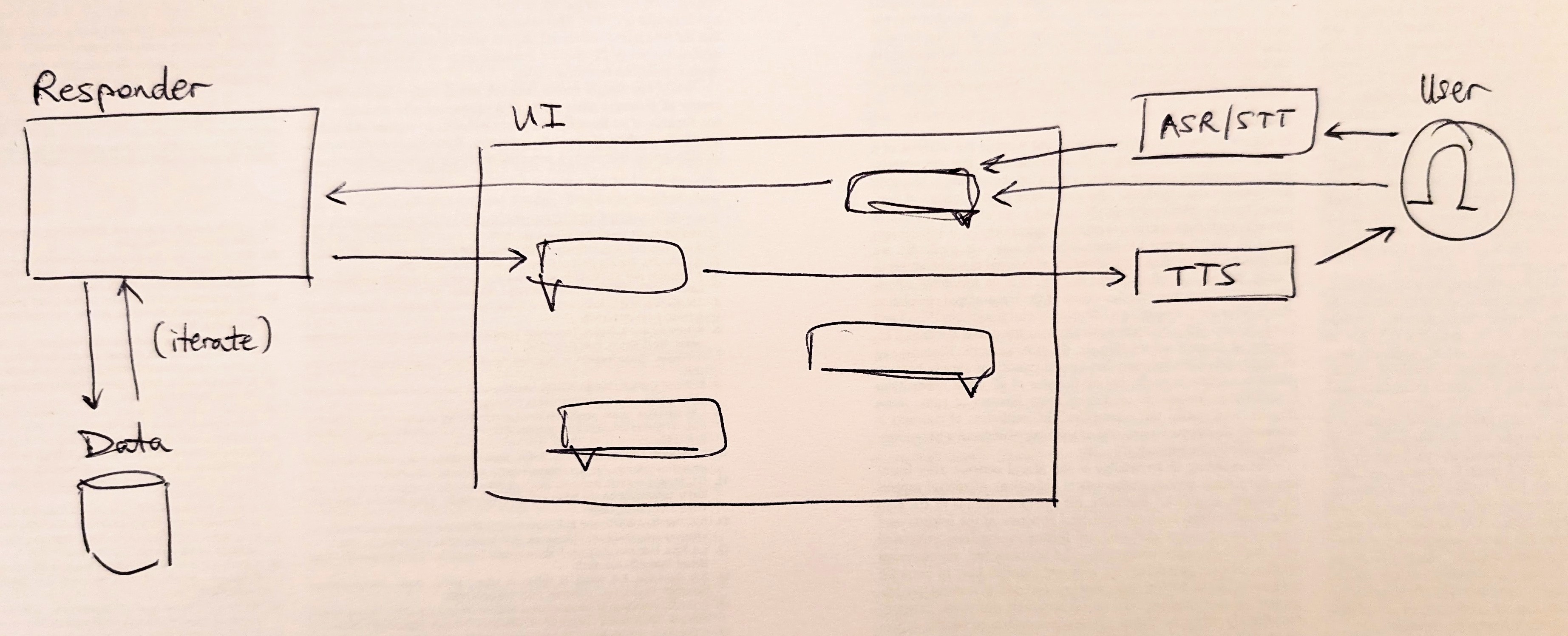
The responder’s role could feasibly be solved by a pure text-to-text LLM call ('user said X, what is your reply?') but, just as agentic assistants are generally better than basic chatbots at code generation, it’s better to give the responder more user-specific context plus the ability to think before responding. Moreover, through experimentation with a range of Python+LLM pipelines which utilise my Anki history to generate insights and dialogic experiences, I found that it both more efficient and more effective to embrace a flexible, agentic architecture; not attempting to predefine research questions and lesson structures but instead equipping an agent (like Claude Code) with high-level direction and historic user data (Anki card reviews) and letting it decide when and how to use them in the role of a personalised tutor.
Demo: user speaks into mic and OpenAI STT API converts the speech audio into text. The message is sent to OpenCode in the backend to generate a text response, which displays in the frontend while also going to Kokoro for conversion into audio for playing to the user. We can see in the backend (LHS) that OpenCode decided to analyse the user's Anki data in the background when coming up with its reply. The user takes another turn, typing in text directly (bypassing the STT API); the message again gets sent to OpenCode which decides to do more data analysis in order to generate its next response.
Making it agentic
So the question becomes more technical - how do I integrate an AI agent into the backend of a chat UI (which runs as a Python FastAPI/Uvicorn server) such that it can receive user messages, process them asynchronously, and decide when to respond back?
OpenCode is ostensibly a coding tool, but here its more relevant abstraction is as an agent harness: it manages model calls, tools, conversation history and the loop in which an agent decides what to do next. It is also open source and supports different model providers, which gives me some control over cost and deeper ability for customisation. It has a client/server architecture, so the tutor system FastAPI server can send HTTP requests to the same OpenCode server that the usual OpenCode TUI would interface with.
During FastAPI startup, the backend checks whether OpenCode is already healthy. If the check fails, it starts OpenCode inside tmux and polls until the server becomes available:
async with httpx.AsyncClient(**client_kwargs) as client:
    try:
        r = await client.get(f"{_server_url}/global/health", timeout=3)
    except Exception:
        subprocess.Popen(
            ["tmux", "new-session", "-d", "-s", "oc-agent",
             "opencode", "--port", "4096"],
            cwd=str(_PROJECT_ROOT),
            stdout=subprocess.DEVNULL,
            stderr=subprocess.DEVNULL,
        )
        for _ in range(30):
            await asyncio.sleep(1)
            try:
                r = await client.get(f"{_server_url}/global/health", timeout=2)
                if r.status_code == 200:
                    break
            except Exception:
                continue
        else:
            raise RuntimeError("opencode did not start within 30 seconds")
I initially expected to use the headless opencode serve command, but messages were not getting processed without a TUI client connected. The working setup therefore launches the OpenCode TUI with its HTTP server (inside a detached tmux session). The TUI may no longer be strictly necessary, but keeping it gives me a useful way to attach to the process and inspect or interact with the tutor agent.
Once OpenCode is running, FastAPI uses the same client to create a session specifically for the tutor rather than reusing whichever coding session happens to be open in the TUI. It stores the resulting session ID and sends an initial instruction message:
r = await client.post(
    f"{_server_url}/session",
    json={"title": "Mandarin Tutor"},
    timeout=10,
)
r.raise_for_status()
data = r.json()
_session_id = data.get("id") or data.get("session", {}).get("id", "")
cfg.setdefault("opencode", {})["session_id"] = _session_id
_write_config(cfg)

await client.post(
    f"{_server_url}/session/{_session_id}/prompt_async",
    json={"parts": [{"type": "text", "text": _SYSTEM_PROMPT}]},
    timeout=10,
)
_SYSTEM_PROMPT is a string which gets automatically passed to the agent as the first prompt, telling it to act as a helpful Mandarin tutor, reply only in Chinese characters, remain concise and conversational, etc.
For each conversation turn, FastAPI creates another asynchronous httpx client, this time with a longer timeout because the agent may think or use tools before answering. It forwards the transcribed student message to the tutor session and awaits the response:
client_kwargs = {"timeout": httpx.Timeout(300.0)}

async with httpx.AsyncClient(**client_kwargs) as client:
    resp = await client.post(
        f"{_server_url}/session/{_session_id}/message",
        json={"parts": [{"type": "text", "text": user_message}]},
    )
    resp.raise_for_status()
    data = resp.json()

parts = data.get("parts", [])
texts = [p["text"] for p in parts if p.get("type") == "text"]
While this is asynchronous from FastAPI's perspective, it is deliberately not a fire-and-forget interaction: the browser waits while OpenCode runs the agent loop and returns its final message. FastAPI extracts the text and sends the result back to the UI (which passes the Chinese text to the TTS module to be read aloud).
I had initially planned to give the agent a dedicated respond_to__student tool. FastAPI would submit a message, the agent would think and use other tools, then eventually it would decide to run bash respond_to_student.sh <response text> to post its reply back to the application. But this was unnecessary - OpenCode and other agentic harnesses already decide when to finish thinking and return a final message for rendering to the user.
This is the full integration. I am reusing the same agent architecture I already find effective for software development, but replacing its user interface and instructions. FastAPI does not need to understand the agent's intermediate reasoning or tool calls; it only needs to start a session, submit each student message and wait for the final text.
Session management & feedback loops
OpenCode saves conversations as a session which I can open and resume through its TUI. This gives me two useful properties for free: the tutor retains in-lesson context, and I can inspect or interact with exactly the same agent directly through the TUI.
The ability to manage sessions means I can resume a previous lesson at a later date, or otherwise manipulate sessions (e.g. export and archive). At present this happens directly in OpenCode's TUI rather than the custom tutor frontend, so a useful next feature would therefore be a session picker in the frontend.
The logs can also become a feedback loop rather than passive history. For example, I could ask the agent at the end of a lesson to record repeated grammar or vocabulary mistakes in the repository, then consult those notes in a later session, in exactly the same way that I might ask a coding agent to leave a breadcrumb of notes for future reference.
The downside of the overall approach is latency - agents can think for a long time before returning their response. There are several optimisation levers I could test to mitigate this: choosing a smaller model, selecting a lower-effort model variant, constraining the available tools, or setting a cap on agent turn length. It might also be that not every tutor response needs agentic capabilities, and most should use a fast path (e.g. LLM call) with the full agent reserved for turns which require full agentic search or analysis of Anki history, for example. Using an agent everywhere is conceptually neat and works for me, but might a sledgehammer in some situations.