Agentic coding projects
I've been using a set of fairly simple techniques as I apply agentic coding across a variety of projects which include:
- Enhanced Anki analysis
- An AI tutor for practicing spoken Chinese
- Macros to enable AI agents to play games (similar to GPT Plays Pokemon FireRed and RS-SDK)
- A multi-agent discussion forum (like MoltBook)
- Explorations of automated research & consulting
To switch across projects, I use techniques which let me operate more as a manager than a programmer. Sometimes I'll lean in when the AI gets stuck, but most of the time I'm defining success criteria and prioritising workstreams.
Task management
The way I work in a nutshell is: upload a set of rough notes which describe what I want to achieve, turn those into a PRD, and turn that into a list of implementation tasks. This happens automatically - see below.
My rough notes (e.g. vision statements, use cases, technical thoughts, external references) generally accumulate naturally but sometimes I'll do some extra brainstorming with ChatGPT. I haven't yet integrated my Obsidian into this workflow but that's probably a next step, especially it has a CLI.
I use pretty much the same prompt for every project, to process notes into concrete user requirements, and then an implementation plan (task list). This is basically doing the same job as /plan mode.
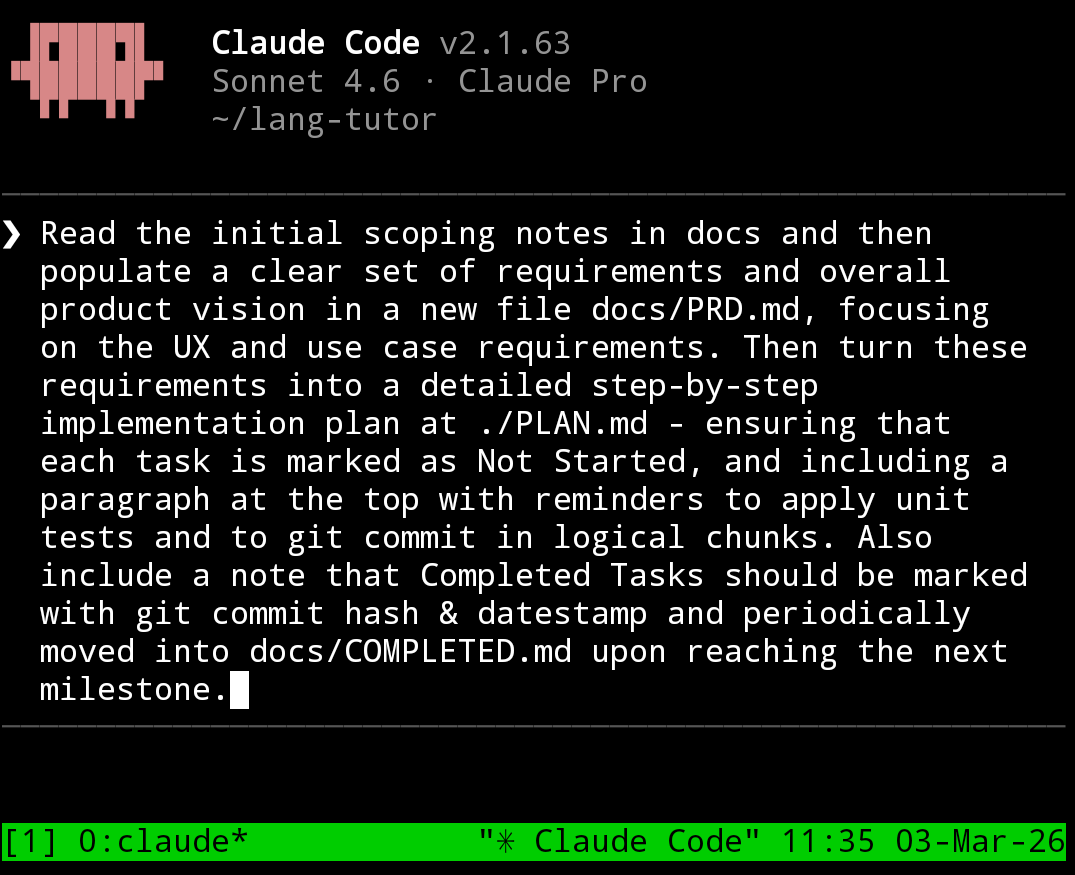
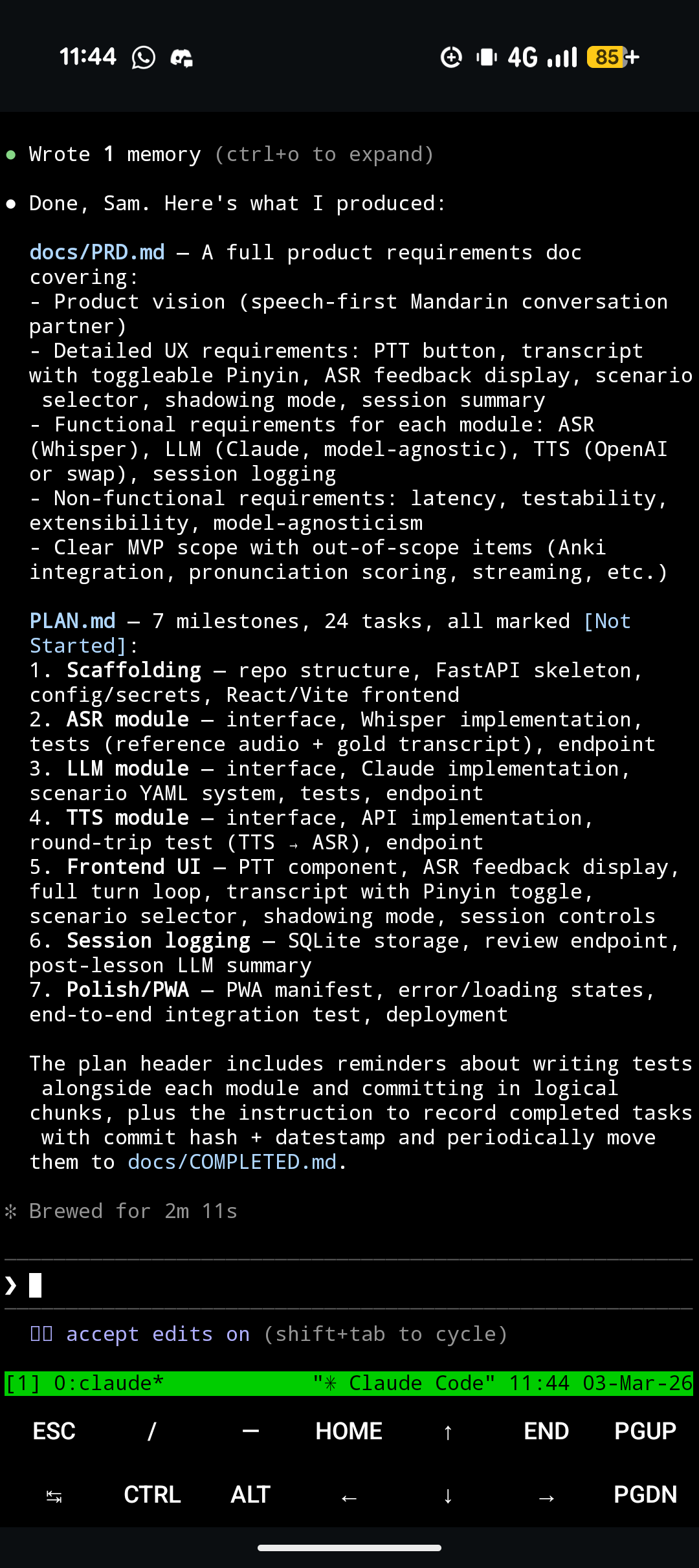
I find the most important part is the task list. Having a task list creates consistency across sessions. Tell your agent to treat the implementation list as the source of truth for what to do next. It also reduces my cognitive load for making progress - I'll often connect to my session and just say: "what's next on the plan? Do that".
Sometimes I'll explicitly ask the agent to insert urgent tasks at various places in the list (e.g. fixes to make immediately), or I'll manually edit it myself (for the agent to pick up when it next checks the list).
Sometimes a plan doc can get a bit too long and stale - this is the downside of a documentation-heavy workflow; my main workaround is to treat 'tidying up documentation' as a first-class task in itself (I'm also considering giving my agents better tools for searching docs e.g. a BM25 script). For example, I'll ask the agent to prune completed milestones (sections of tasks) into a COMPLETED.md. My current CLAUDE.md file is a modified version of this one with more emphasis on task tracking (although I'm considering streamlining or removing it given current issues with Claude's token limits) and mentions some of these principles.
I'll also typically ask it to check recent git history, provided changes have indeed been committed (I'll often need to remind the agent to "git commit in logical chunks" even though it's specified in AGENTS.md). More generally, It can be helpful to consistently "land the plane" to ensure that the end of a session forms helpful context for a subsequent one.
Speaking of reviewing conversation history, in the context of Anthropic token limits being squeezed as more enterprise and ex-ChatGPT users adopt Claude, apparently it's also much better to give Claude access to conversation logs rather than using claude --resume directly. It also might be worth disabling the 1M context window and switching back to 200k auto-compact default.
Ratchets
Two other tactics I've used recently - both of which could provide inspiration for ways to solve issues on future projects:
- Encourage the agent to make its own tools
Claude has a weird preference for repeatedly writing long throwaway python -c or chained Bash commands. A manager should notice this pattern and intervene - directing the agent to write a reusable script instead (more reliable and can be adapted if similar commands are needed in future).
Gemini CLI was repeatedly failing to write proper Python or to edit code properly (Gemini seems to not understand how to use its own tools like WriteFile etc..) so I asked it to write a script for fixing IndentationErrors and to call this when making edits (a hook would probably be more robust).
- Provide reference documentation
I was working on having Claude control the player in a Pokémon FireRed emulator and wanted it to take some reference values from a bigger repo that I stumbled across. A useful keyword to know here is git submodule - Claude will be able to use this if it wants to nest a repo inside of an existing project.
Similarly, for a different use case, I scraped a wiki, dumped all relevant raw content into a /wiki folder, and let the agent read and utilise as needed (e.g. summarising into an overall walkthrough guide).
Dev environment
I feel like one of the big upsides of agentic coding, and being in the manager rather than programmer seat, is the ability to code on-the-go (e.g. on the Tube) without feeling like it's necessary to sit in front of a laptop or to access lots of other software and files.
I use Termux on my phone and SSH into VMs in which I run Claude inside tmux (for persistence and for juggling multiple projects - tmux rename-session -t 0 my-app is pretty handy); this is a pretty good starting point (but obviously there are a lot more tmux commands and the whole thing can be pushed to scale a lot further).
I could use a notification service but for now I simply have Claude play a bell chime when it needs my attention. This is in my ~/.claude/settings.json:
  "hooks": {
    "Notification": [
      {
        "matcher": "",
        "hooks": [
          {
            "type": "command",
            "command": "printf '\\a' > /dev/tty"
          }
        ]
      }
    ],
    "Stop": [
      {
        "hooks": [
          {
            "type": "command",
            "command": "printf '\\a' > /dev/tty"
          }
        ]
      }
    ]
  }
I've also added in a statusline:
  "statusLine": {
    "type":  "command",
    "command": "~/.claude/statusline.sh"
  },
where statusline.sh is:
#!/usr/bin/env bash

input=$(cat)

# --- Core fields ---
PROJECT_DIR=$(echo "$input" | jq -r '.workspace.project_dir')
DIR_NAME="${PROJECT_DIR##*/}"

PCT=$(echo "$input" | jq -r '.context_window.used_percentage // 0' | cut -d. -f1)

# --- Colors ---
CYAN='\033[36m'
GREEN='\033[32m'
YELLOW='\033[33m'
RED='\033[31m'
WHITE='\033[37m'
RESET='\033[0m'

# --- Context color thresholds ---
if [ "$PCT" -ge 90 ]; then
  BAR_COLOR="$RED"
elif [ "$PCT" -ge 70 ]; then
  BAR_COLOR="$YELLOW"
else
  BAR_COLOR="$GREEN"
fi

# --- Context bar ---
BAR_WIDTH=10
FILLED=$((PCT * BAR_WIDTH / 100))
EMPTY=$((BAR_WIDTH - FILLED))

printf -v FILL "%${FILLED}s"
printf -v PAD "%${EMPTY}s"
BAR="${FILL// /█}${PAD// /░}"

# --- Git branch ---
if git rev-parse --git-dir > /dev/null 2>&1; then
  BRANCH=$(git branch --show-current 2>/dev/null)
else
  BRANCH=""
fi

# --- Rate limits ---
FIVE_H=$(echo "$input" | jq -r '.rate_limits.five_hour.used_percentage // empty')
FIVE_H_RESET=$(echo "$input" | jq -r '.rate_limits.five_hour.resets_at // empty')

WEEK=$(echo "$input" | jq -r '.rate_limits.seven_day.used_percentage // empty')
WEEK_RESET=$(echo "$input" | jq -r '.rate_limits.seven_day.resets_at // empty')

fmt_time() {
  [ -z "$1" ] && return
  date -d @"$1" +"%H:%M" 2>/dev/null || date -r "$1" +"%H:%M" 2>/dev/null
}

fmt_datetime_pretty() {
  [ -z "$1" ] && return

  # Get components
  DAY=$(date -d @"$1" +"%-d" 2>/dev/null || date -r "$1" +"%-d")
  MONTH=$(date -d @"$1" +"%b" 2>/dev/null || date -r "$1" +"%b")
  TIME=$(date -d @"$1" +"%H:%M" 2>/dev/null || date -r "$1" +"%H:%M")

  # Determine ordinal suffix
  if [ "$DAY" -ge 11 ] && [ "$DAY" -le 13 ]; then
    SUFFIX="th"
  else
    case $((DAY % 10)) in
      1) SUFFIX="st" ;;
      2) SUFFIX="nd" ;;
      3) SUFFIX="rd" ;;
      *) SUFFIX="th" ;;
    esac
  fi

  echo "${MONTH} ${DAY}${SUFFIX} ${TIME}"
}

LIMITS=""

if [ -n "$FIVE_H" ]; then
  RESET_FMT=$(fmt_time "$FIVE_H_RESET")
  LIMITS="5h: $(printf '%.0f' "$FIVE_H")%(${RESET_FMT})"
fi

if [ -n "$WEEK" ]; then
  RESET_FMT=$(fmt_datetime_pretty "$WEEK_RESET")
  LIMITS="${LIMITS:+$LIMITS | }7d: $(printf '%.0f' "$WEEK")%(${RESET_FMT})"
fi

# --- Line 1: project + branch ---
LINE1="${CYAN}${DIR_NAME}${RESET}"
[ -n "$BRANCH" ] && LINE1="${LINE1} | 🌿 ${BRANCH}"

# --- Line 2: context + limits ---
LINE2="${BAR_COLOR}${BAR}${RESET} ${PCT}%"
[ -n "$LIMITS" ] && LINE2="${LINE2} | ${WHITE}${LIMITS}${RESET}"

# --- Output (2 lines) ---
echo -e "$LINE1"
echo -e "$LINE2"
to give a bar like:

and I've re-enabled verbose traces with "showThinkingSummaries": true.
Reflections
I haven't been thinking as much about model capabilities or code logic as I have about how to design my harness and workflow to best facilitate my role as an agent's manager. There are moments when I can trust the agent to handle the details while I focus on the high level. But I think this does rely on the model being, and remaining, sufficiently smart.
What’s interesting is that this creates a slightly unstable equilibrium. As models improve, the surface area of what can be delegated expands, and the value of good 'management infrastructure' compounds. But when models fail - whether through context loss, tool misuse, or subtle reasoning errors - I'm reminded that this abstraction is still leaky. You can’t fully step away; you have to design for recovery, not just execution.
Fundamentally, while it's interesting and valuable to spend time building these systems, a nagging thought I have is that 90% of my time has gone into corralling an agent to build a language tutor app while only 10% of my time has gone into actually using it. It's an interesting tension without a single, clear answer on whether it should be re-balanced.